Secure QR ordering
Secure QR ordering for table-side and contactless service
Guests scan a QR code with their phone camera; the menu opens in the browser and orders land in your kitchen panel. Layered security options help block fake or wrong-table orders.
What is a secure QR ordering system?
A secure QR ordering system lets dine-in guests reach a digital menu and place orders without paper menus or waiting for staff. With Dijifis you can start with a simple menu QR and step up to staff-verified orders or session-based variable codes as volume grows.
Scanning the table QR opens your menu; the guest builds a basket and the order is sent straight to your restaurant panel.
Less physical menu handling; menu and price updates are managed centrally from the admin panel.
From a fixed menu code to staff-verified submission or one-time session QR — you choose the security level.
Three security levels — pick what fits
Use the same Dijifis stack: begin with digital menu only, then tighten rules when traffic or risk increases. For product walkthroughs see our QR menu ordering page.
Fixed QR — digital menu
One table QR shows the current menu to every guest. Orders may be taken by staff or submitted on request — fast to deploy, low operational overhead.
Verified orders — staff confirmation
Before sending the basket, the guest shares an on-screen code with staff; only verified orders enter the system. Cuts remote or prank submissions noticeably.
Variable QR — per session or guest
Short-lived or single-use codes per sitting; even if shared, they cannot be reused. Best for busy dining rooms and stricter security needs.
What secure QR ordering adds to your operation
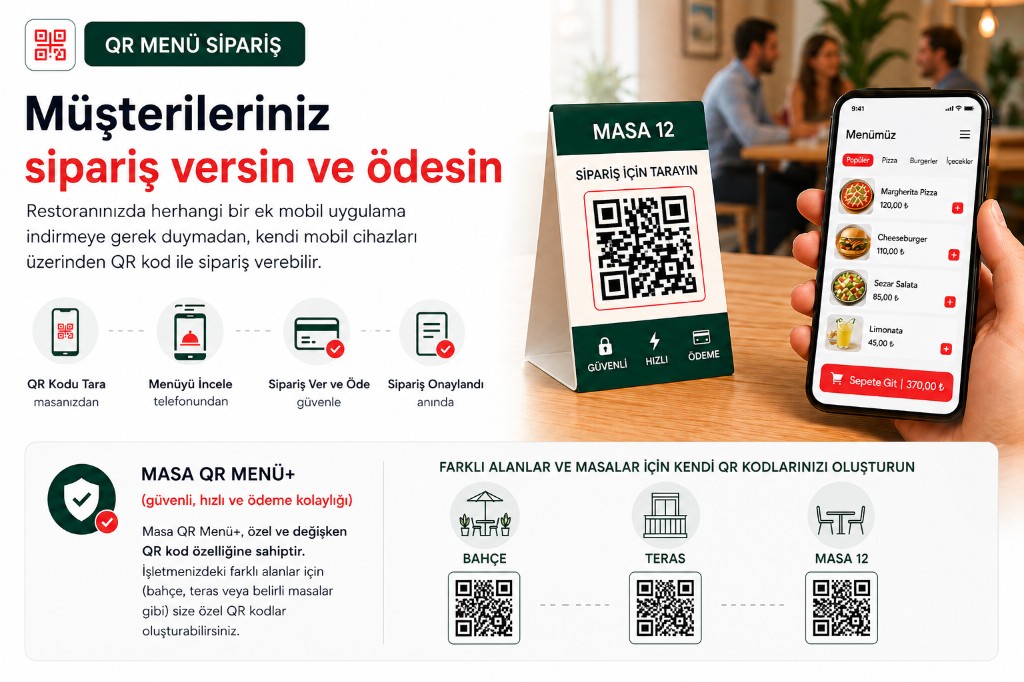
Reduces phone-order load and printed menu cost; staff spend less time taking notes and more time serving. Table QR orders sit in the same panel as delivery, pickup, and online channels.
Define separate QR sets for garden, terrace, and indoor areas — always know which table an order came from.
- No app install — mobile browser is enough
- Orders flow directly to kitchen and service screens
- Optional in-venue online payment and bill split
- Unified panel with delivery and online channels
How secure QR ordering works
A typical flow takes a few steps; verification or variable codes appear depending on your security level.
-
Scan the QR code
The guest scans the table QR; your branded menu opens in the browser.
-
Browse and build a basket
They review items, pick options, and add to cart — prices reflect your live menu from the panel.
-
Security step (optional)
Staff approval or session QR validation runs when enabled; unverified orders are not submitted.
-
Kitchen and panel
Approved orders trigger alerts in your admin panel and enter the kitchen queue.
-
Service and payment
Food is served at the table; guests may pay online at the table or ask staff to settle the bill.
Benefits for your business
Speed up front-of-house while keeping digital channel risk under control.
Lower fake-order risk
Verification codes and variable QR filter attempts from outside or the wrong table.
Staff efficiency
Servers focus on verification and service instead of writing orders — faster turns at peak hours.
Always up-to-date menu
Digital menu updates instantly from the panel; no reprint cycles or outdated prices on paper.
One panel, all channels
QR table orders alongside delivery, pickup, and marketplace integrations in one operations view.
Secure QR ordering — FAQ
- Is secure QR ordering actually safe?
Yes — you choose the level. Staff-verified or session-based variable QR greatly reduces fake and remote orders. You can start with a fixed menu QR and upgrade later.
- Do guests need to install an app?
No. They only use the mobile browser; no App Store or Play Store requirement.
- Is QR ordering the same as contactless ordering?
Often overlapping: less physical menu and counter contact. Our contactless page emphasises hygiene; this page focuses on secure QR infrastructure.
- Can I use it as digital menu only?
Yes. Level 1 shows an up-to-date menu via QR while staff may still take orders verbally. Enable online ordering when you are ready.
- What is the difference between verified flow and variable QR?
-
Verified flow requires staff confirmation before submission; variable QR generates a unique code per session that cannot be reused. Compare modes on the QR menu ordering guide.
Get started
Contact us about an online ordering solution for your business and start taking orders on your own channel with Dijifis.